
Live Twitter Prayers Display Tool
Overview
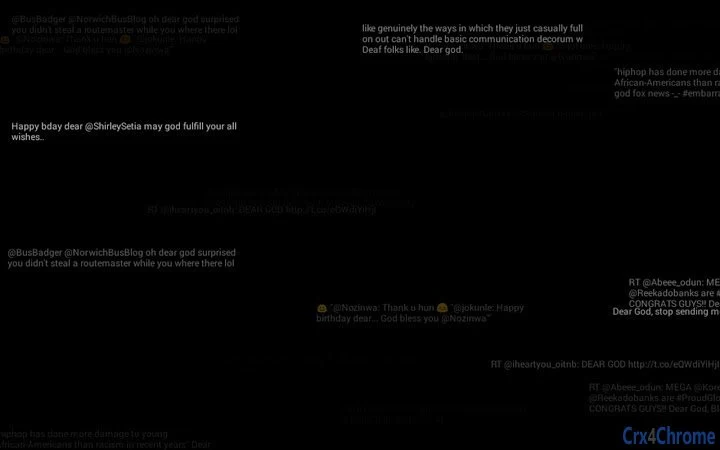
The Live Twitter Prayers Display Tool presents a real-time visual stream of tweets containing the phrase "Dear God." Designed as a piece of post-internet art, the software examines the evolving relationship between spirituality and digital culture. It captures a moment in contemporary online behavior where personal faith is expressed through social media platforms. The application functions as both a cultural observation tool and an artistic commentary on how technology mediates human belief systems.
Target users include digital artists, cultural analysts, and individuals interested in internet phenomena. The software is particularly relevant for those studying the convergence of religion, technology, and public expression in the digital age. While not a functional utility in the traditional sense, it serves as an interactive exhibit that reflects on how online spaces have become new arenas for spiritual expression.
Developed by Dan Cainey, the tool is part of a broader artistic exploration into how digital environments shape human behavior and belief. The work contributes to discussions about the role of algorithms, data streams, and public discourse in modern spiritual practices. Its real-world application lies in educational settings, art installations, and personal reflection on digital identity and faith.
Key Features & Capabilities
- Real-time Tweet Stream: Displays live tweets containing the exact phrase "Dear God" as they are posted on Twitter.
- Minimalist Interface: Presents content in a clean, unobtrusive layout focused solely on the text stream.
- Post-Internet Art Integration: Functions as a digital artwork that comments on the intersection of technology and spirituality.
- Platform Accessibility: Available for both Windows and Mac, enabling broad access to the digital experience.
- Lightweight Design: At just 1.2 MB, the application requires minimal system resources to run.
The software operates by continuously fetching public Twitter data through the platform's API. It filters and displays only messages matching the specified phrase, creating a live feed of digital prayers. This feature allows users to witness spontaneous expressions of faith in real time, offering a unique perspective on collective online behavior. The minimalist interface ensures that the content remains the focus, avoiding distractions common in social media clients.
For artists and researchers, this tool provides a dynamic dataset for analysis. It can be used to study linguistic patterns, emotional tone, or geographic distribution of online prayers. The application’s design reflects its artistic intent—simple, intentional, and focused on the experience rather than functionality.
User Interface, Workflow & Performance
The user interface is intentionally sparse, emphasizing the content over design. The application opens with a full-screen or windowed display of the live tweet stream, with no additional controls or navigation elements. Users can view the text as it appears, with minimal interaction required. The workflow is passive: launch the app, observe the feed, and reflect on the content.
Navigation is not a primary concern, as the software does not include menus, settings, or user profiles. The experience is designed to be immediate and immersive. Users are not prompted to log in or configure preferences, aligning with its role as an art installation rather than a productivity tool.
Performance details were not specified by the developer. However, given the application’s small size and reliance on external data fetching, it is expected to operate efficiently on modern systems. The developer did not specify resource usage details. Stability appears to be consistent with standard desktop applications, though no formal testing data was provided.
Compatibility & System Requirements
The software is compatible with both Windows and Mac operating systems, making it accessible to a wide range of users. The application version is 1.0, indicating a stable release. Installation size is 1.2 MB, which is minimal and suitable for quick deployment.
Exact system requirements were not listed. The developer did not provide additional system requirements. Compatibility information is limited to the operating systems mentioned. No specific hardware specifications, such as CPU or RAM, were included. Users should expect standard performance on modern desktops and laptops.
Pros and Cons
Pros
- Unique artistic concept that explores digital faith and internet culture
- Minimalist design enhances focus on the live content stream
- Small file size ensures quick installation and low resource usage
- Available for both Windows and Mac platforms
- Free to download and use
Cons
- No user controls or customization options
- Dependent on external Twitter API, which may affect availability
- Limited functionality beyond displaying text
- No offline mode or data caching
- Not suitable for productivity or everyday tasks
FAQ Section
Is the Live Twitter Prayers Display Tool available for Windows and Mac?
Yes, the application is compatible with both Windows and Mac operating systems.
Is the software free to use?
Yes, the software is available at no cost to users.
Does the app require an internet connection?
Yes, the application requires a continuous internet connection to fetch and display live tweets.
Can I customize what tweets are displayed?
Currently, the app only displays tweets containing the phrase "Dear God" and does not offer filtering or customization options.
Is the software secure to install and run?
As a lightweight desktop application from a known artist, the software is considered safe. However, users should only download from official sources to ensure integrity.
Final Thoughts + CTA
The Live Twitter Prayers Display Tool stands out as a distinctive piece of digital art that invites reflection on how technology shapes modern spirituality. While it lacks traditional software functionality, its value lies in its conceptual depth and real-time cultural observation. For artists, researchers, and anyone interested in internet culture, it offers a rare, immersive experience of collective digital prayer.
Its minimalist design, cross-platform availability, and zero cost make it accessible to a broad audience. Though not intended for daily use, it serves as a powerful commentary on the evolving nature of belief in the digital age.
Download Live Twitter Prayers Display Tool now to experience a unique intersection of faith, technology, and art.







